

Friday was a good reminder of how important trading discipline is. I recently added a very useful dashboard to the Discord from my home set up.
A lot of traders enter positions without a plan for getting out. They pick a stock, a direction, and a size. They do not pick a stop level until the position is already moving against them, at which point emotions are involved and the decision is harder to make clearly.
The result is positions held too long past where the trade was wrong, or closed too early on normal volatility that had nothing to do with the thesis. Neither is a strategy.
I built a tool that calculates your exits before you enter. You know your stop, your target, and your risk before you place the order.
Ticker Lookup
Enter a ticker and your entry price and the tool calculates structured exit levels in seconds. Stops are sized to how each stock actually moves, not to a round number. A low-volatility name gets a tighter stop in dollar terms. A high-volatility name gets a wider one. The same framework applied to both gives you a risk that is proportionate to how that specific stock trades.
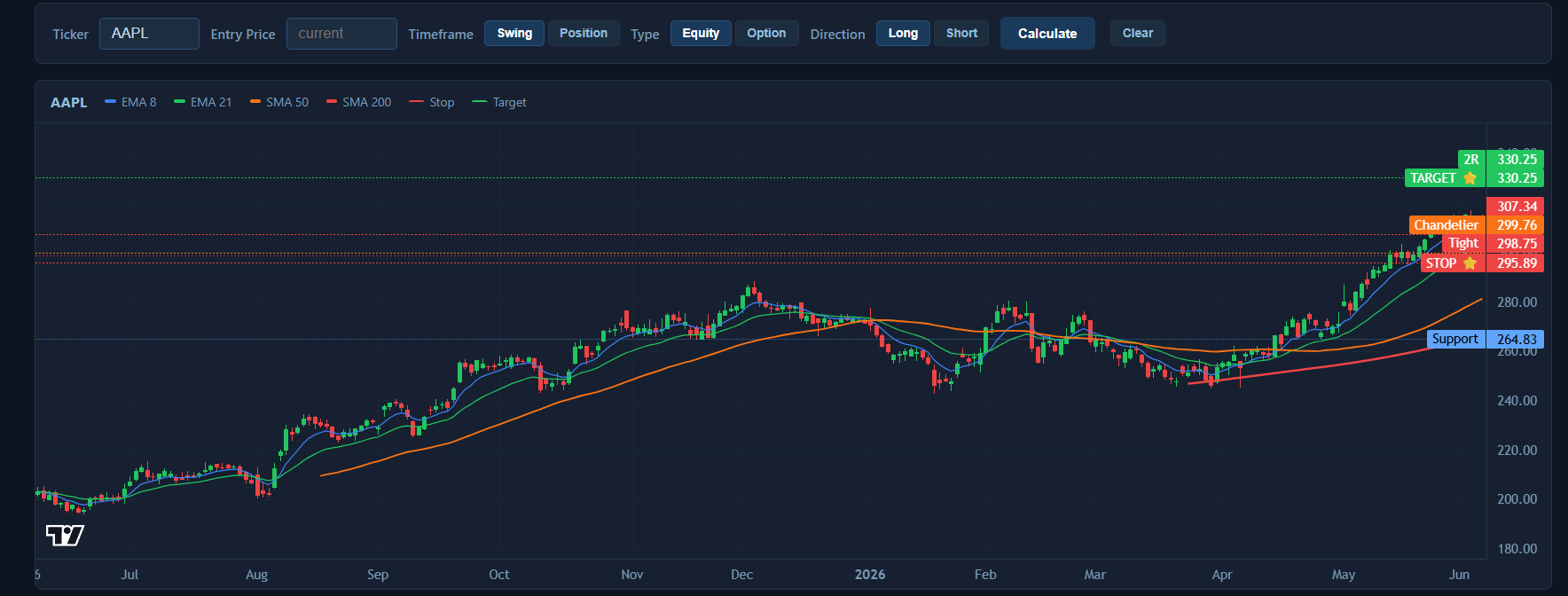
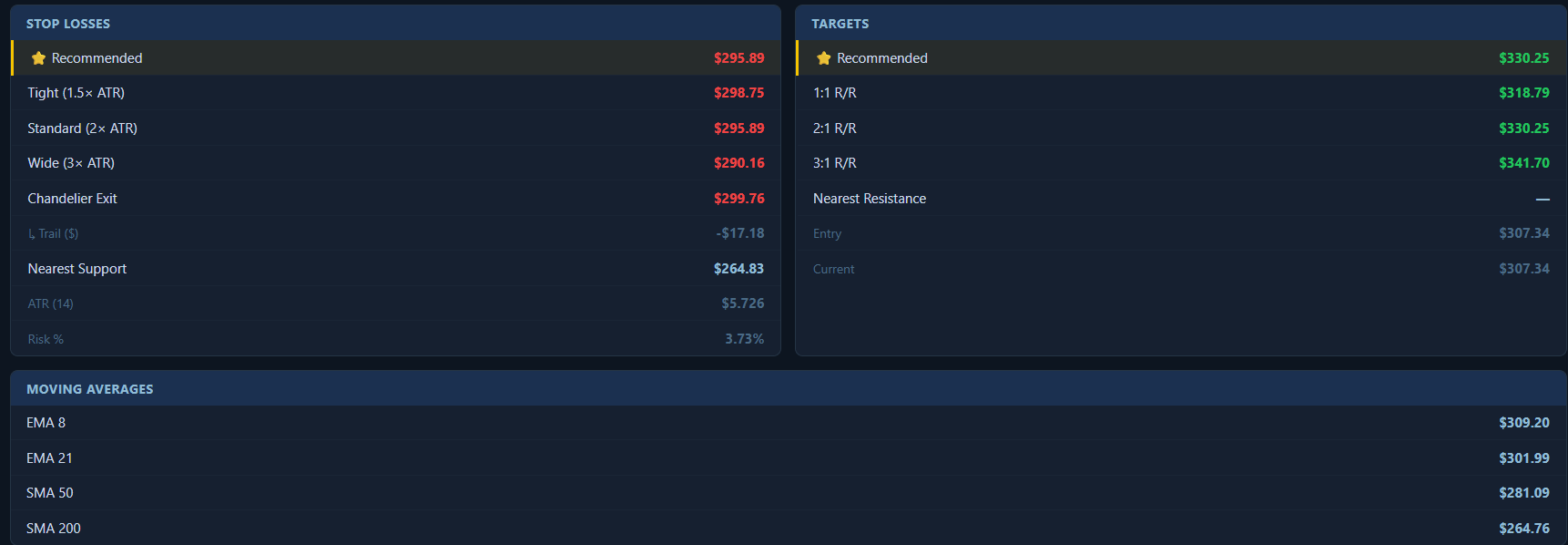
Three stop tiers are shown: tight, standard, and wide. The recommendation is always the standard tier, adjusted against the nearest technical support level so your stop is not sitting directly at a visible price where it is more likely to be hit.
Targets are set at 1:1, 2:1, and 3:1 risk-to-reward from your entry. The recommended target is capped at the nearest resistance so you are not projecting through a ceiling that is likely to interrupt the move.
Long and short positions are both fully supported. For a short, the stops sit above your entry and the targets sit below it. All the logic inverts automatically.
Trailing Stops
Once a position is running, the question changes. You are no longer protecting against being wrong. You are locking in profit while giving the trade room to continue. A static stop set at entry does not do that well. It either gets left too far behind or you move it manually at the wrong time.
The tool calculates a Chandelier trailing stop for every position. This stop anchors to the peak of the move and trails behind it, automatically ratcheting higher as the stock makes new highs. It never moves backward.
The dollar trail amount is shown in the format your broker expects it, so you can enter it directly into a trailing stop order without any additional calculation. The tool also tells you when to switch from the initial stop to the trail. Until the position has moved enough for the trail to clear the initial stop, the initial stop is the better choice.
Portfolio Analysis
The portfolio tab runs the same calculations across your entire book in one pass. Upload a positions export from Schwab, Fidelity, or IBKR and the tool processes every position automatically. No reformatting required. The broker format is detected and parsed for you.
Each position receives a status badge based on where the current price sits relative to the calculated levels. OK means the position is inside its range. Trailing means it has moved enough to consider switching to the trailing stop. At Target means the recommended exit has been reached. Review means the stop is close. Offside means the stop has been broken.
Your positions never leave your browser. The file is processed locally in the tab and no portfolio data is sent anywhere.
Options Mode
The tool handles options positions separately from equity. Enter the expiry, strike, call or put, and the premium paid or received, and it calculates the correct exits for that type of position.
Long options have a different problem than stocks. Time decay means you cannot hold an underwater position indefinitely waiting for the thesis to play out. The standard rule for long options is to stop out at 50% of the premium paid and take partial or full profit at 50% and 100% gain. The tool calculates those levels and shows the underlying stock price that corresponds to each exit.
Sold options require the opposite framing. The risk is unlimited on the wrong side, so exits are anchored to the credit received. The stop level is when the option has moved to twice what you collected. The target is when it has lost half its value through decay.
Contracts inside 21 days to expiry are flagged with a warning. Time decay accelerates sharply in the final three weeks and positions in that window need closer attention.
Built for Members
The Stop and Target Calculator is part of the Rhodie House Options Intelligence platform, available to paid Discord members alongside the live options flow dashboard, signals scoring, the volatility suite, and the rest of the toolkit I have built for active options traders. The full user guide covers every feature in detail and is accessible directly from the tool.

